AI video is no longer only a creative experiment. It is becoming part of how teams test ideas, build content, explain products and communicate visually across digital platforms.
For technical teams, this shift is especially interesting.
Developers, product managers, marketers and operations teams already work with structured assets: screenshots, product images, documentation, voice notes, recorded demos, training material and customer education content. The challenge is turning those assets into clear video without creating a large production process every time.
That is where modern AI video tools are starting to become useful. The best systems are moving beyond simple prompt generation and toward multimodal workflows, where text, images, audio and video references can all guide the result.
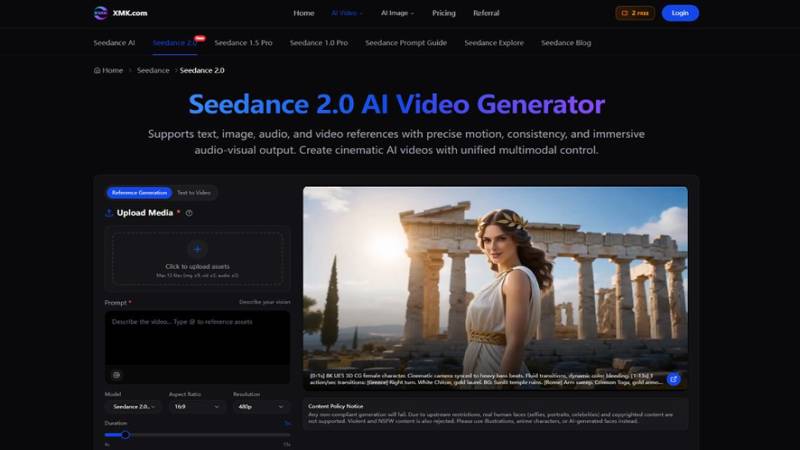
One example is Seedance 2.0, an AI video generator that supports text, image, audio and video references with control over motion, consistency and audio-visual output. For teams that care about repeatable workflows, this kind of reference-based approach is more practical than typing a vague prompt and hoping for the best.
Why AI Video Is Becoming a Workflow Tool?
Most business content is no longer created in one format.
A product update may need a blog post, a short video, a social clip, a demo visual and an internal explainer. A training team may need written documentation, a narrated walkthrough and a quick visual example. A SaaS company may need videos for onboarding, support and feature launches.
Traditional video production still matters for polished campaigns. But many daily video needs are smaller and faster. Teams often need a clear draft before deciding whether to invest in a full edit or production cycle.
AI video helps at this early stage. It can turn a static idea into a moving draft that people can review, discuss and improve. For technical teams, that can make video feel less like a separate creative project and more like part of the normal content pipeline.
Technical teams can use a video to gif converter to turn short demonstrations from AI video workflows into easy-to-share GIFs.
Prompt-Only Generation Has Limits
Text prompts are useful, but they are not enough for many real projects.
A team may need a product image to stay recognizable. A software company may want a video to match an existing interface style. A creator may want motion to follow a reference clip. A training department may need a video to align with a voiceover or script.
If the model only receives text, it may miss important details.
This is why reference-based workflows matter. Sudanese 2.0 allows users to upload text, image, audio and video assets, then describe how each input should shape the result. The prompt becomes part of a larger brief rather than the only source of direction.
For teams that already have assets, an AI video generator becomes more useful when it can work with those materials directly.
Asset-Guided Video Helps Preserve Context
Technical content often depends on context.
A product demo should not invent features that do not exist. A training video should not confuse the user interface. A brand campaign should keep the same visual language across multiple assets. A social clip should communicate the right message without changing the product story.
Asset-guided video can help reduce that gap.
With Seedance 2.0, users can combine references and instructions. An image can act as a first frame. A video can guide movement. Audio can shape pacing. A prompt can describe camera motion, lighting, transitions and atmosphere.
This gives the model more information about what the user wants. It also gives the team more control during review, because the output can be compared against approved source materials.
Editing Without Starting Over
One practical problem with AI video is revision.
The first draft may be close, but not finished. The motion may be right while the transition feels wrong. The lighting may work, but the clip may need to be extended. A scene may need a small adjustment without rebuilding the entire video.
Seedance 2.0 is designed for this kind of iterative workflow. Its page describes features such as extending an existing clip, merging multiple videos with transition logic, replacing characters without full regeneration and refining small segments.
That matters because real teams rarely accept the first version of any asset. They review, adjust, compare and approve. A useful AI video tool should support that loop rather than forcing users to restart every time.
Where Technical Teams Can Use It?
The strongest use cases are usually practical.
Product teams can create early video drafts for feature explanations. SaaS companies can turn screenshots or interface concepts into short onboarding visuals. Marketing teams can test campaign videos before a full production pass. Support teams can create simple visual examples for common customer questions. Developers and startup founders can use short videos to explain concepts more clearly in pitch decks or launch pages.
These use cases do not require AI to replace editors or designers. They require AI to reduce friction between an idea and a first visual draft.
That is where cinematic AI video becomes useful. It helps teams test motion, pacing and structure before they spend more time on final production.
A Practical Workflow
Teams can get better results by treating AI video like a repeatable process:
- Define the purpose of the video.
- Collect approved source assets, such as images, audio, screenshots or reference clips.
- Decide which asset should guide the first frame, motion, timing or style.
- Write a prompt that describes the scene, platform, camera movement and intended audience.
- Generate a short draft first.
- Review for accuracy, brand fit, motion quality and audio alignment.
- Refine the strongest version instead of regenerating endlessly.
This keeps the workflow grounded. The tool helps create options, but people still decide whether the result is accurate and useful.
Responsible Use Still Matters
AI video tools should be used carefully.
Teams should avoid uploading copyrighted material unless they have permission. They should also be careful with real human faces, celebrity likenesses and any content that could mislead viewers. The Seedance 2.0 page includes a content policy notice explaining that real human faces, copyrighted content, violent material and NSFW content are restricted.
This is especially important for public-facing content. A video can look polished while still using the wrong asset, implying the wrong message or creating compliance issues.
Faster workflows should still include review.
The Bigger Shift
AI video is becoming more practical because it is becoming more controllable.
For technical teams, that matters more than novelty. A tool is useful when it fits into a workflow, respects existing assets and helps people move from concept to draft without losing direction.
Seedance 2.0 reflects this shift. It combines multimodal references, motion control, audio-video output and iterative editing in a way that makes AI video easier to use for real content work.
Prettier clips will not define the future of AI video only. Better workflows: clearer inputs, stronger control, easier refinement and more reliable review will define it.
For teams that need to communicate technical ideas visually, that may be the most important change. See more.